

What’s New in Stego v1.23
v1.23 is focused on fundamentals and usability. No major new features.
We put the work into reducing the small friction points that come up in day-to-day scenario work.
Getting started
Social Login
Stego now supports Google and GitHub login. You don’t need to create a separate account. Just use your existing account.
Device Language Settings
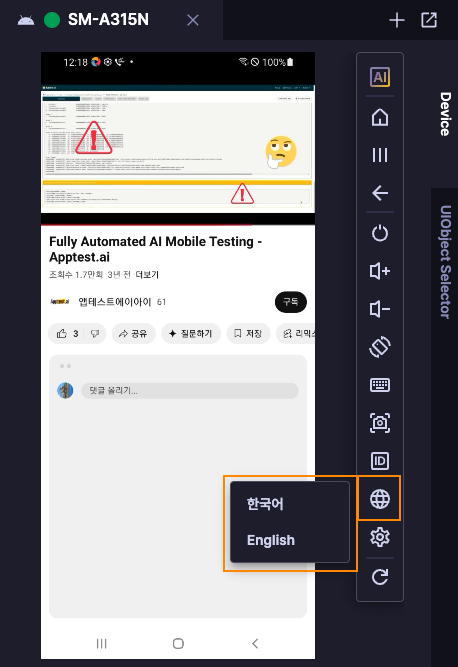
You can now switch a connected device’s language between Korean and English directly from Stego. Previously, language settings were locked on remote device farms(RDF) for security reasons. Now you can switch them directly from Stego. If you’re testing across different locales, this saves a few steps.
Workspace
Detachable Device & Output Panels
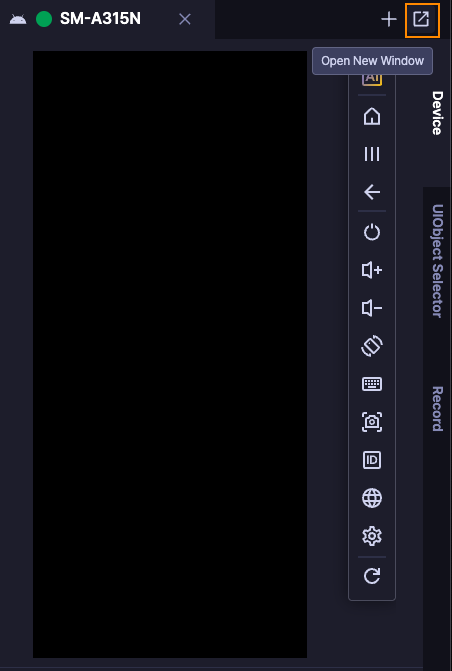
The Device and Output panels can be popped out into their own windows. With a multi-monitor setup, you can keep the device view on one screen and the scenario editor on the other, without switching back and forth.
Relocated Menu
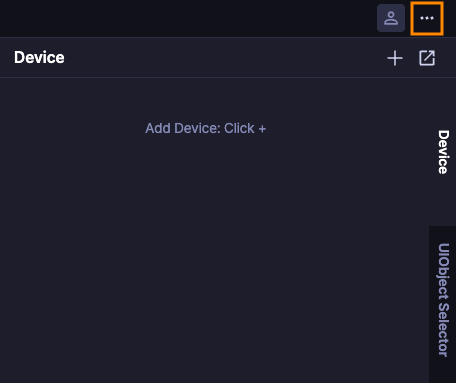
The hamburger menu moved from the upper left to a More icon on the right side. Keeps the controls closer to where you’re already working.
Test control
Sync Action ‘On Failure’ Property
When a Sync action failed in D2D tests, the whole test used to fail with it. Now you can set what happens on failure, so your scenarios can handle edge cases without blowing up the entire run.
Accessibility Structure Improvement
Accessibility in the UIObject Field is now split into Path and Property. One is always active; if the other is disabled, it shows “Not used” explicitly. No guessing about what’s actually being captured.
What’s next
Small changes, but they add up when you’re in Stego every day.
What’s coming next goes further. Stay tuned.
